Setup Xbox Controller to Navigate Win11
EDIT (5-11-26): Don’t use this if you intend on using Steam and Big Picture Mode. The controller doesn’t function as intended in Steam Big Picture Mode, but might still be useful if you just need the controller to function as a mouse within windows 11 for whatever reason.
I’m currently using an HP Victus 16 laptop (RTX 4060) and will be keeping it as a windows based console for Steam Big Picture Mode. Here’s a quick way to setup an Xbox controller to navigate Windows 11 instead of a mouse incase it’s needed as a fallback for whatever reason. I’ve only tried this with an official Xbox controller and Windows 11, I’m not aware if this works on previews Windows or different controller combinations unfortunately.
1) Press Win (Windows key) + G to bring up the Xbox Game Bar

2) Click on the settings icon (gear on the right)
3) Enable “Gamepad Cursor”
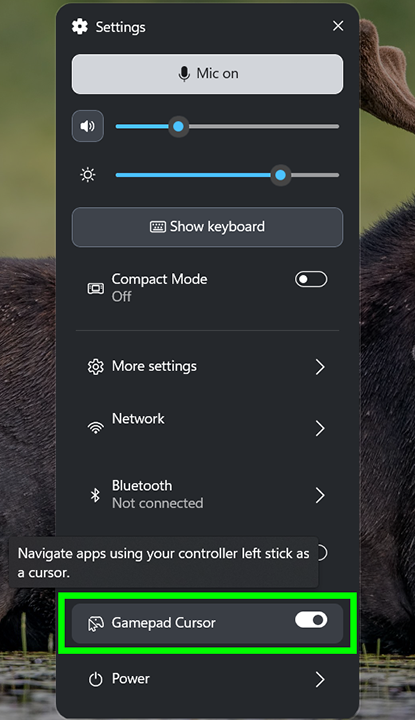
Exit Xbox Game Bar and your Xbox controller should now be able to function as a mouse device. 👍
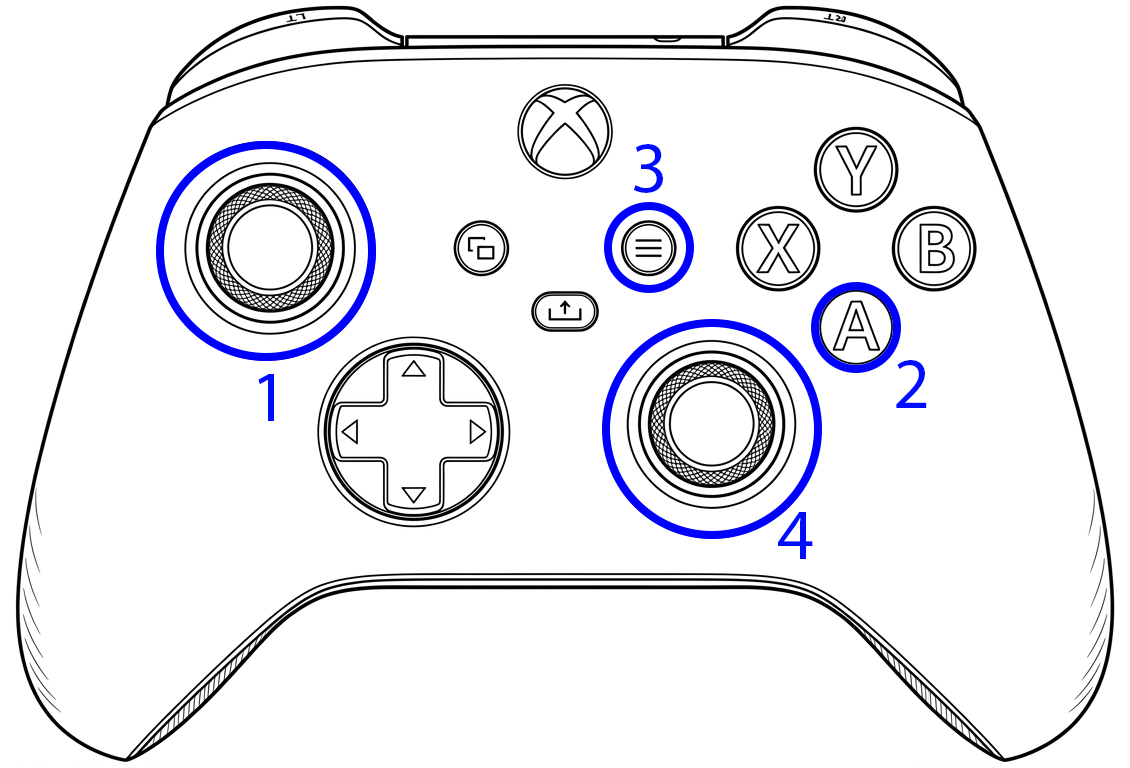
1) Move mouse cursor
2) Left mouse click
3) Right mouse click
4) Scroll page up/down